TL;DR: I kept losing track of what I was working on in Claude because I context switch between projects and work outside of Claude all day. Projects helped a little, but I start new chats inside them when a chat gets long, so unfinished work still got buried. My fix is a sidebar group called “Active.” I keep only my current chats in it, collapse everything else, and swap chats in and out as they get long.
What was I doing again?
My days are full of context switching. I move between projects in Claude and work that happens completely outside of Claude, so I found that I was losing track of what conversation I was working on in Claude, especially if I am working across different projects and have multiple conversations going on within the same project.
Projects are a good first step in organizing my work, but I needed another layer to help me identify which chats I was actively working on.
Context Management in Claude
Starting a new chat is the best move for context efficiency once a conversation gets long. Thus, I try to start new conversations once I’ve completed a subtask within a project.
So why does a long chat get worse? Anthropic calls it “context rot.” The more Claude (and any AI model, really) has to hold in a conversation, the fuzzier its recall of earlier details gets. It is not a cliff where everything suddenly breaks. It is more like a long meeting where the details from the first hour are a little blurry by hour three. Anthropic’s explanation is that Claude has an “attention budget,” and every new bit of text spends a little of it. If you want the full version, here is Anthropic’s post on effective context engineering.
There is a usage side too. Claude’s help center article on length limits says paid plans get a 200K token window, so you have plenty of room. But if you have code execution turned on, Claude automatically summarizes older messages to keep a long chat going, and those long chats use up more of your usage limit. Their own advice is to start a new conversation if you are getting close to your limit in a long chat.
Starting the new chat inside the same project helps, because it still has the project’s instructions and files. You get a fresh start without setting everything up again. It worked well, but it also set up a different problem for me.
Why projects alone were not enough
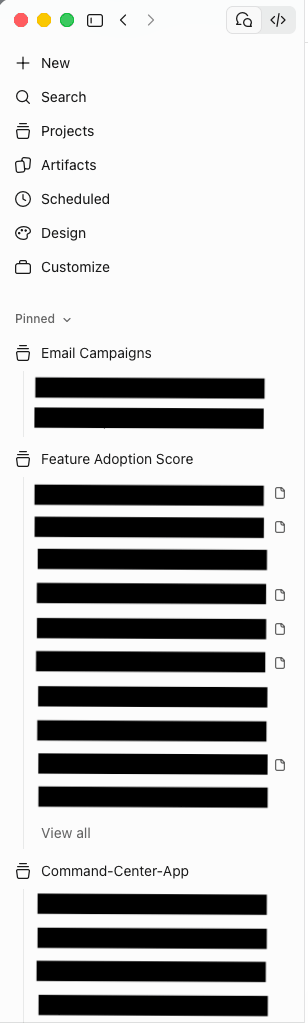
Once I start a new chat inside a project, that project has more than one chat going. Sometimes the older chat has something I did not finish before I had to move on to other work.
So I would come back and still be lost, just one level deeper. I’d forget what I was working on within the project. Sometimes Claude puts a blue dot next to the chat to indicate I need to pick it back up, but I didn’t find that super consistent or helpful.
My solution is a group called “Active”
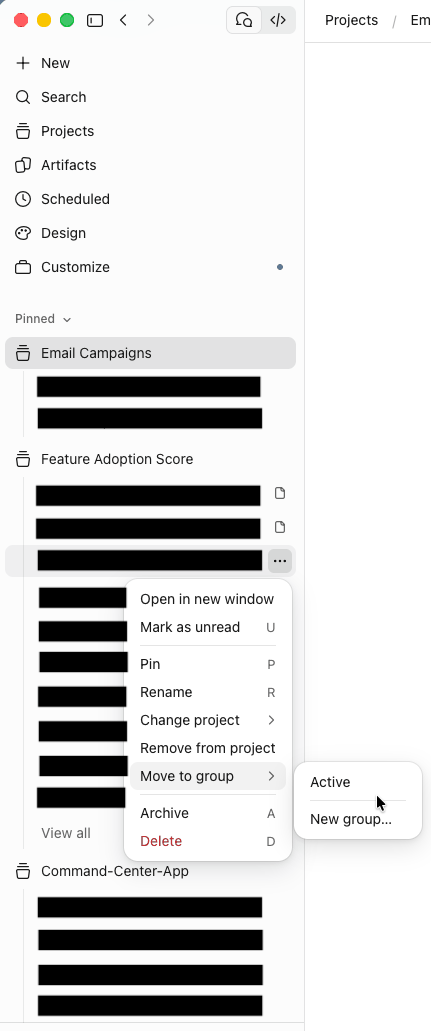
I recently discovered that you can create groups in the sidebar and move chats into them. So I made one called Active.
In the screenshot below, I am moving a chat into it. Open the chat’s menu, choose Move to group, then pick Active (or New group if you do not have one yet).
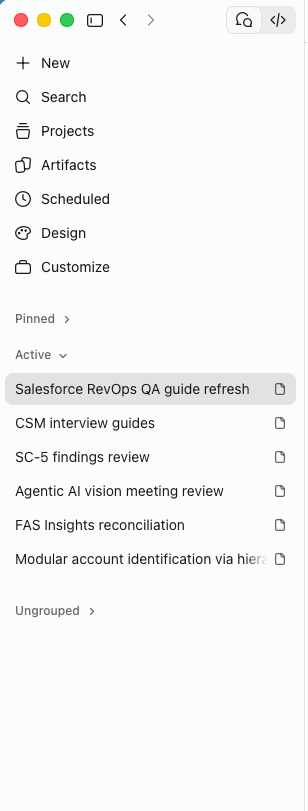
Then I collapse every other group and leave only Active open. Now when I open Claude, I can see exactly what I am working on right now and nothing else.
My routine
The whole system is four small steps, and the key is that the Active group never fills up with old chats.
- When a chat gets too long or I finish a subtask, I remove it from the Active group. It stays with its project.
- I open a new chat inside that project.
- I move the new chat into Active.
- Every other group stays collapsed, so Active is the only thing I look at.
That way, Active always reflects the conversations I am working in today, and the long chats I have moved on from are still in their projects if I need to look something up.
To me, groups are a lot like tags. A project tells me where a chat belongs. A group tells me what I am focused on right now.
If you context switch a lot like I do, try making your own Active group. It is a simple way to stay organized, and I wanted to share it as a tip for anyone who has the same problem.
Frequently asked questions
Open the menu on a chat in the sidebar, choose Move to group, then choose New group. Once a group exists, it shows up in that same menu next to New group.
In my setup, the chat stays with its project. I remove long chats from Active and open a new chat in the same project.
Context rot is Anthropic’s name for the way a model’s ability to recall information from its context decreases as the number of tokens grows. Anthropic describes it as a gradient rather than a hard cliff, so long chats get less precise over time instead of suddenly failing.
According to Claude’s help center, longer conversations that trigger automatic context management consume more of your usage limit. It also suggests starting a new conversation if you are approaching your usage limit in a longer chat.
Leave a Reply